
Sign-in provides one route to the game lobby, promotions, loyalty levels and cashier. It does not remove KYC or bonus restrictions: an account can open normally while a withdrawal remains unavailable until identity checks and promotional wagering are complete.
Play at SpinRiseAUD and crypto · 18+ · Terms apply
Visit SpinRiseSpinRise login essentials
The access process is short, but credentials, device state and account verification play different roles.
| Access item | SpinRise arrangement |
|---|---|
| Entry point | Login control in the website header |
| Credentials | Registered email and password |
| Security prompt | reCAPTCHA when triggered |
| Recovery | Password reset through the registered email |
| Devices | Computer, tablet and mobile browser |
| Australian account | AUD available as the selected currency |
| Withdrawal access | Dependent on KYC and cleared bonus conditions |
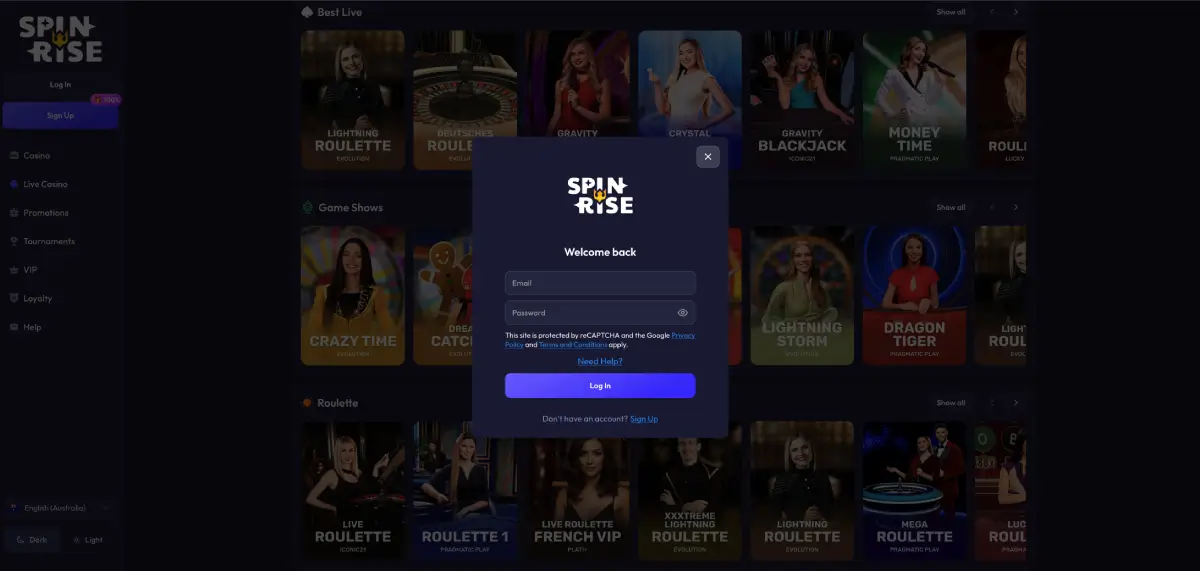
How to sign in on desktop
Use the known SpinRise address and submit the form once. Repeated clicks or several open login windows can make it harder to identify whether the session succeeded.
- Load SpinRise in a current desktop browser.
- Select the header login control.
- Enter the email used during registration.
- Type the corresponding password with the correct capitalisation.
- Complete reCAPTCHA if it appears.
- Submit and allow the dashboard to load.
- Ensure the expected account and currency are displayed before using the cashier.
New users should complete the SpinRise registration process rather than trying credentials that have not been created.
Password reset and email recovery
A forgotten password does not require another account. Use the recovery option attached to the login form and keep the registered inbox secure.
- Open the normal sign-in panel.
- Select its password-reset route.
- Enter the exact account email.
- Inspect the inbox and filtered folders for the recovery message.
- Follow the newest valid link.
- Create a password not used by email, banking or another casino.
- Return to SpinRise and sign in with the new credential.
Do not send the old password or reset link to chat. If the registered inbox is no longer accessible or no message arrives after the address is reviewed, contact SpinRise through the known support channel for account recovery instructions.
Mobile login on iPhone and Android
No application is required for mobile account access. Safari and Chrome can load the responsive form, and credentials remain the same across devices. The SpinRise mobile guide explains safe home-screen shortcuts.
- Open the header menu if the login control is collapsed on a small display.
- Watch for automatic capitalisation or an added space from the keyboard.
- Wait for reCAPTCHA and the form to load before submission.
- Use a private connection for cashier and verification activity.
- Sign out completely on a borrowed phone or tablet.
A saved shortcut can preserve a browser session, so an unlocked phone may expose the balance. Device security and account logout both remain necessary.
Fixing common SpinRise access problems
Login faults can be divided into credential, browser, connection and account-status categories. Change one factor at a time rather than creating another profile.
| Symptom | Likely area | Response |
|---|---|---|
| Email or password rejected | Credential entry | Review spelling and capitalisation, then use recovery |
| Form reloads without access | Cookie or browser session | Try a private window or another current browser |
| reCAPTCHA does not complete | Page or browser conflict | Reload once and review blocking extensions |
| Session ends when changing pages | Connection or stored site data | Use a stable connection and start a fresh session |
| Account or cashier restricted | KYC, duplicate profile or security review | Ask support for the account-specific requirement |
| Reset message absent | Email entry or filtering | Inspect filtered folders and ensure the registered address was used |
Clearing all browser data should not be the first action because it affects unrelated sessions. An alternative browser is a cleaner diagnostic. If it succeeds, remove only the SpinRise site data from the preferred browser.
Verification after login
KYC is separate from routine access and commonly arises before the first withdrawal. It can require identity, address and payment-method evidence.
| Verification area | Purpose |
|---|---|
| Identity document | Connects the account to the adult account holder |
| Address evidence | Supports the registered residential details |
| Payment confirmation | Shows ownership of a relevant card, e-wallet or other method |
Files should be complete, readable and uploaded through the protected account process. A name, birth date or payment method that does not align with registration can delay review. Verification status, not login speed, is a key factor in the first payout.
What becomes available after sign-in
The dashboard connects gambling and account management without a separate mobile profile.
- Pokies, live casino and jackpot sections.
- AUD, fiat and cryptocurrency cashier access.
- Welcome stages and recurring promotions.
- Kingdom loyalty and VIP progress.
- Profile details and document submission.
- Withdrawal requests after eligibility checks.
The SpinRise bonus guide explains wagering that can keep funds restricted. Game access after login does not mean a promotional balance can already be withdrawn.
Account security checklist
SpinRise uses SSL and reCAPTCHA, but user-controlled security remains important because mandatory two-factor authentication is not identified in the account setup.
- Keep separate passwords for the casino and registered email.
- Enter through a known address rather than a message link.
- Do not save credentials in a shared browser profile.
- Protect devices with a screen lock.
- Reject anyone requesting the password or recovery link.
- Review cashier history after an unexpected access issue.
If credentials were entered into an imitation page, secure the email account, reset SpinRise access and tell support about any unrecognised account or payment activity.
When to contact support
Live chat and email are the identified support channels. Chat is appropriate for an immediate access-status question, while email can preserve a longer written account of a restriction or document issue.
Prepare the registered email, relevant transaction reference and a concise description. Never disclose the password. A duplicate-account, KYC or security restriction cannot be removed by changing browsers; only the operator can identify the required action.
Australian access takes place under a Curaçao licence, without an Australian licence or BetStop participation. Login is restricted to adults aged 18 and over, and an exclusion should never be bypassed by opening another account. Set session limits before signing in and use the responsible gambling resources or Gambling Help Online if account access is becoming compulsive.
SpinRise Casino login FAQ
These answers cover credentials, mobile use, recovery, KYC and restricted accounts.
How does the SpinRise Casino login work?
Select the header login control, enter the registered email and password, complete reCAPTCHA when shown and wait for the account dashboard.
Can SpinRise login be used on mobile?
Yes. The same credentials work in mobile browsers on iPhone and Android, with no native app or separate mobile account required.
How is a forgotten password reset?
Use the recovery option in the login panel and follow the newest message sent to the registered email. Do not share the recovery link.
Why does the login form keep reloading?
A cookie, extension or browser-session conflict may be responsible. Test a private window or another current browser before removing stored site data.
Is verification needed for every login?
No. KYC is separate from routine sign-in and is usually connected to withdrawal access or another account review.
Why can games open while withdrawal remains blocked?
The account can permit login and play while verification or bonus wagering remains incomplete. Review the cashier and promotion status, then ask support if the restriction is unclear.
Can another account be opened after losing access?
No. Use password recovery or support. A duplicate profile can itself trigger restrictions when identity details are reviewed.
Can this guide unlock a SpinRise account?
No. Only SpinRise support can inspect account records, explain a security review or change access details.
Note. SpinRise holds a Curaçao licence, is not licensed in Australia and is not covered by BetStop. Offers and limits can change; the casino's terms apply. 18+.